Issue an invoice
One screen takes the order, prices it against the catalogue and applies the tax for the country the branch trades in.
Stock leaves · receivable, revenue and tax post
Prospera · business software for African trade
Prospera records the sale, moves the stock and posts the double entry in the same step. Your staff never open the accounting screen, and there is nothing waiting to be reconciled at the end of the month.
Every business verified · no card to start · 55 African countries and 41 currencies configured
Hybrid Maize Seeds (25kg) × 5 · VAT 7.5%
Balanced
What it posts
Every money document in Prospera writes its own journal when it is issued, and reverses it if you void the document. That is the whole idea.
One screen takes the order, prices it against the catalogue and applies the tax for the country the branch trades in.
Stock leaves · receivable, revenue and tax post
Cash, POS, mobile money or bank transfer, recorded against the payment channel the money actually landed in.
Bank or cash rises · the receivable clears
Goods received, branch transfers and stock counts, each one a single step rather than a document plus an adjustment.
Quantities move · the variance posts at cost
Salaries, fuel, rent. You choose what it was for and where it was paid from, and Prospera works out the two sides.
Expense recognised · the account paid from falls
Profit and Loss, Balance Sheet and Cash Flow are assembled from those entries. Nothing is typed a second time.
Statements built from the ledger itself
You keep selling the way you already sell. Prospera keeps the record, entry by entry, so the books are ready the day your accountant asks for them.
One sale, four places
A salesperson issues invoice INV-00007
Five bags of maize seed, priced from the catalogue, with Nigerian VAT applied because the branch trades in Nigeria.
₦150,500.00
Invoiced
The stock leaves the branch
Issuing is what moves the goods. There is no second screen to remember, and the quantity on hand is right the moment the customer walks out.
−5 bags
Abuja Head Office
One journal posts, balanced
Receivable and cost of goods sold on the debit side. Revenue, tax payable and the inventory reduction on the credit side. Nobody typed it.
₦240,500.00
Debits, and credits
The month moves
Profit and Loss, Balance Sheet and Cash Flow are read from those entries, so the statement and the stock room describe the same business.
₦50,000.00
Gross profit on this sale
Gross profit here is the ₦140,000 of revenue less the ₦90,000 the seed cost. The ₦10,500 of tax is owed onward, so it is never counted as earnings.
Getting started
01
Currency, tax labels, the name for a region, date and number formatting all follow from it. 55 African countries and 41 currencies are set up already.
02
Import a spreadsheet of products, customers and suppliers, or add them as you go. A starting chart of accounts is created with the company.
03
Your staff work in Sales, Inventory and Banking. The bookkeeping happens behind those screens, in the same step, without anyone opening Accounting.
The software itself

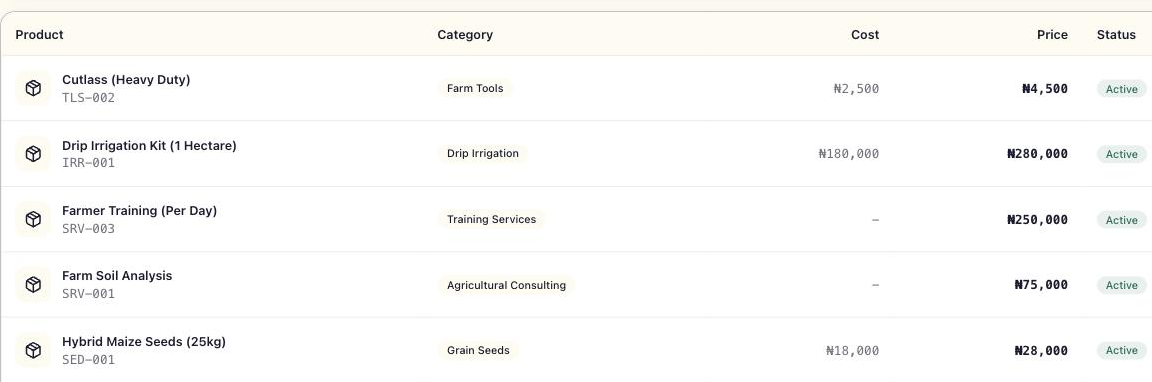
Where it works
Questions
No. Your staff issue invoices, take payments, receive goods and record expenses in plain language. Prospera decides which accounts each of those touches and posts both sides. The Accounting screen is there for when your accountant wants to look, not for daily work.
Issuing an invoice takes the goods out of stock at the branch you sold from, and posts one journal: the receivable and the cost of goods sold on the debit side, the revenue, the tax payable and the inventory reduction on the credit side. It is the entry shown at the top of this page.
Yes. Prospera reverses the original journal and posts the correction, so the audit trail keeps both. System generated entries are locked against hand editing for that reason, and a manual journal is always available when your accountant needs one.
Yes. Branches each carry their own stock, their own document numbering and their own trading country. Reports run for one branch or across all of them.
55 African countries and 41 currencies ship with the product, each with its own currency symbol placement, decimal and thousands separators, date format, tax identifier label and region label.
Against a payment channel you set up: cash, POS terminal, mobile money or a bank account. The channel decides which ledger account the money lands in, so the bank balance in Prospera and the bank balance at the bank describe the same thing.
Yes, and they are Paystack’s, not ours. Online payments by card, bank transfer or USSD go through Paystack, which charges a small processing fee on each payment and takes it before the money reaches your bank. Every online payment provider charges such a fee; Prospera receives none of it. The current rates, worked examples and a calculator are on the Online payment fees page, linked at the foot of this page.
Yes. Product and report tables export to CSV, and documents such as invoices and quotations generate as PDF.
Creating a company account is free and does not ask for a card. You can load your catalogue and issue real documents before deciding anything.
Open a set of books
Apply, and once we have verified your business, load what you sell and issue a real invoice. The first entry posts itself, and you will see the whole idea in about ten minutes.
Every business verified · no card asked for · your data stays yours · export to CSV and PDF at any time